AREA
An open toolkit for extracting eye-tracking data from AR headsets, generating heatmaps, dwell and fixation measures and other interaction event-based analysis.
Overview
AREA extracts raw eye-tracking data from an AR headset and writes it to a clean, versioned CSV — one file per session, ready for analysis.
Each gaze ray is logged together with the object it lands on and its point on the scene, on a single clock shared with task events. Because the application already knows the identity and position of every object on every frame, areas of interest are exact and require no manual coding from video afterwards.
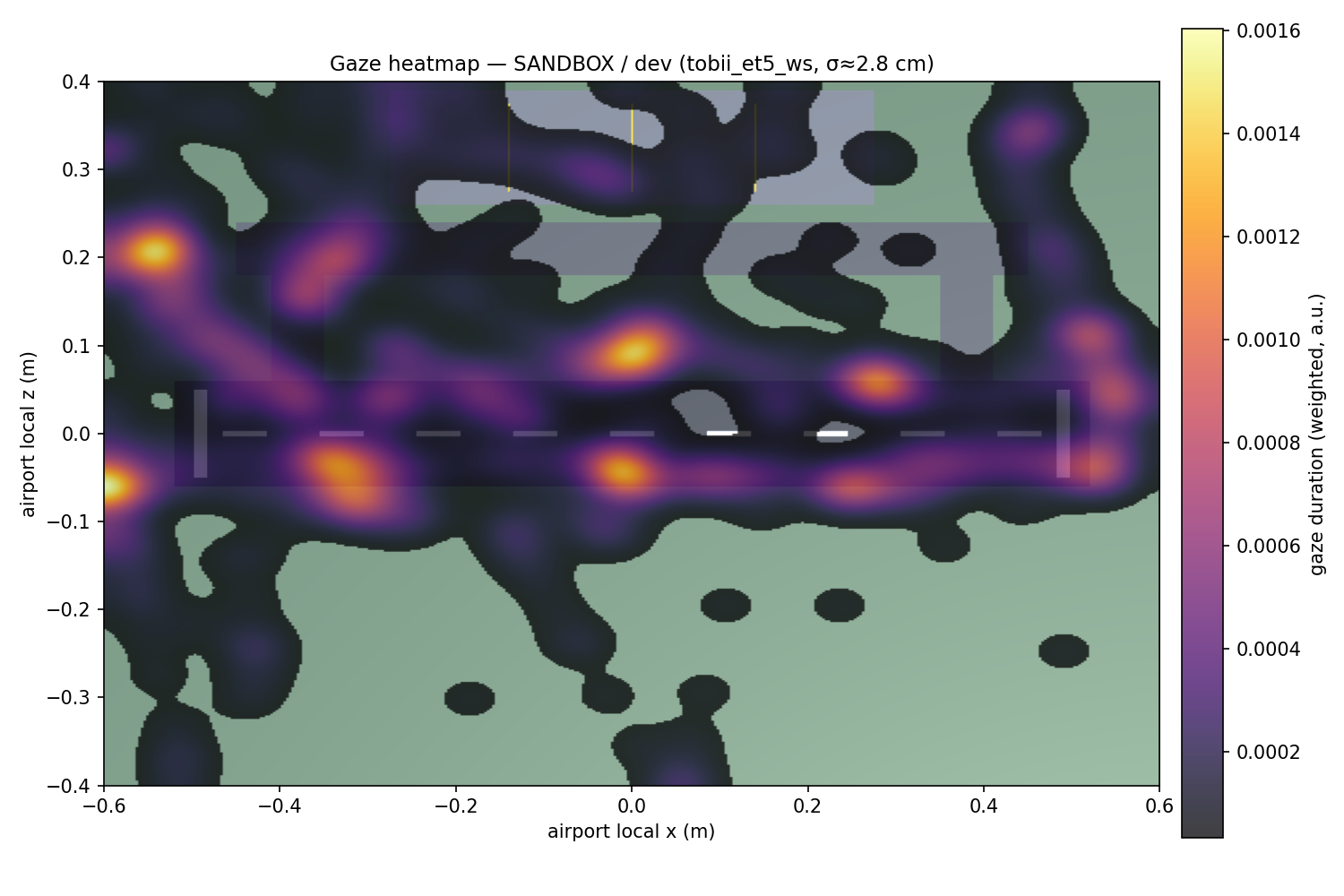
The toolkit ships with sample Python scripts that turn those CSVs into the outputs a study reports: duration-weighted heatmaps, AOI dwell and transition summaries, dispersion-based fixations, and event-aligned measures — plus a per-session data-quality report. The principle is simple: log richly once, derive everything on read.
“We can place an operator inside a live AR scene and watch them work — but the headset’s eye-tracking stays locked inside the device. To study visual attention in a safety-critical task, we need that gaze out: as heatmaps, as dwell, as a dataset we can analyse.”
How it works
Three stages behind one interface. The capture front-end can change — a research headset, a desktop tracker, or just a mouse — without any downstream tool knowing the difference, because every source writes the same schema.
Read the gaze
On device, gaze comes from Microsoft’s Extended Eye Tracking SDK on OpenXR — per-eye and combined rays at up to 90 Hz, independent of frame rate.
For screen-based development a Tobii Eye Tracker 5 feeds the same interface over a local bridge; a mouse source needs no hardware at all.
Write it down, once
One versioned CSV per session: gaze and task events on a single clock, each ray resolved to the object it hit and its point on the ground plane.
Coordinates are stored in the scene’s local frame, so sessions overlay regardless of where the participant stood or moved.
Derive the findings
Sample Python scripts read the schema and produce heatmaps, AOI dwell tables, fixations and event-aligned metrics — plus a per-session data-quality report.
Everything is recomputed from the log, so a new measure never needs a new recording.
What it measures
- Heatmaps
- Duration-weighted density on a chosen reference surface, with the smoothing bandwidth set in degrees of visual angle rather than arbitrary pixels — so the blur matches the tracker’s accuracy.
- AOI dwell & transitions
- Dwell time and proportion, visit counts, mean dwell per visit, switch rate and the transition matrix between areas of interest.
- Fixations
- Dispersion-based detection (I-DT), appropriate at 30–90 Hz — no velocity-based saccade claims the sample rate can’t support.
- Event-aligned metrics
- Whether the runway was checked in the seconds before each clearance; time from a cutoff-zone incursion to first gaze on the zone; the scan preceding an error.
- Data quality
- Tracking-loss percentage, effective sample rate, calibration flag and halo-ambiguity rate, reported per session.
| Area of interest | Category | Dwell (s) | Share | Visits | Mean / visit |
|---|---|---|---|---|---|
| Airport ground | Surface | 11.73 | 11.5% | 62 | 0.19 s |
| Runway | Surface | 6.59 | 6.5% | 25 | 0.26 s |
| Taxiway | Surface | 1.33 | 1.3% | 21 | 0.06 s |
| Apron | Surface | 0.88 | 0.9% | 13 | 0.07 s |
| Saab | Aircraft | 0.33 | 0.3% | 3 | 0.11 s |
| Drone | Aircraft | 0.18 | 0.2% | 3 | 0.06 s |
| Bus | Vehicle | 0.03 | 0.03% | 1 | 0.03 s |
| Slingsby button | Button | 0.03 | 0.03% | 1 | 0.03 s |
Quickstart
Drop in the package. Tag your objects. Record.
Add the Unity package by git URL, and the analysis by pip. Tag the
objects you care about with GazeAOI, add one
LogEvent line at each task action, build, and record.
- No MRTK dependency in the core — works with MRTK2 & MRTK3.
- An editor mouse source lets you build the whole pipeline with no hardware.
- A synthetic-session generator ships with the analysis, so the metrics run before any headset does.
# Unity — add the package (Packages/manifest.json)
"com.area.eyetracking": "https://github.com/madebycharles/area.git?path=unity/Packages/com.area.eyetracking"

# Python — install the analysis toolkit
$ pip install "git+https://github.com/madebycharles/area.git#subdirectory=analysis"

# Analyse a session
$ area heatmap  session.csv --bg airfield.png
$ area events   session.csv --out results/
$ area synth    demo.csv          # no headset needed
The repository does not bundle third-party SDKs — pull each one and AREA plugs into it:
- Microsoft Extended Eye Tracking SDK
- The
Microsoft.MixedReality.EyeTrackingNuGet package — install via NuGetForUnity. The MIT-licensedExtendedEyeGazeDataProvider.csis included; the binaries are not. - Mixed Reality OpenXR plugin
- Add
com.microsoft.mixedreality.openxrvia the Mixed Reality Feature Tool or the package manager. Required on device. - Tobii ET5 bridge
- A separate local WebSocket server (the
enhanced-tobii-eyetrackerfork) speaking theflidis-gaze-wscontract. Development only — published data should come from the HoloLens. - Python packages
numpy,pandas,scipy,matplotlib— installed automatically with the analysis package.
AREA is an open, OpenXR-native toolkit for AR eye-tracking, built for aviation human-factors research and released for reuse. If it supports your work, please cite it.
Njoku, C. (2026). AREA — AR Eye-Tracking Analyser [software]. https://github.com/madebycharles/area